SAS Viya MCP Servers: Governed Agent Access for BFSI
September 04, 2026
When AI agents can call SAS Viya: what MCP changes for a regulated estate
AI agents will reach your SAS® Viya® estate within the next planning cycle, either through SAS's
own tooling or through a client someone in the business already uses. The useful question for a
platform owner is how that access is governed. This post answers it.
The question you are actually being asked
Somewhere in your organisation a business team has asked whether "the AI" can run the model, pull the
report, or explain why a decision fired. Until recently the honest answer was that a person had to sit
between the language model and the platform, copying results in and out. That gap was slow. It was also a
control. Remove it and the model can act on the platform directly.
The Model Context Protocol (MCP) is the mechanism that removes it. SAS announced the SAS Viya MCP
Server at SAS Innovate in April 2026 and describes it as a connectivity layer that exposes analytics, models
and decisioning "as standardized, callable tools for AI agents". Any MCP-compatible client can use it, which
includes agent platforms your teams may already have.
The exposure to manage is an ungoverned path into production analytics. Our position, from running an
MCP tool server against SAS Viya in our own environment, is simple. An MCP server is a new privileged
client of your estate. Govern it like one. The rest of this post explains what that means in practice.
MCP in terms a Viya administrator already knows
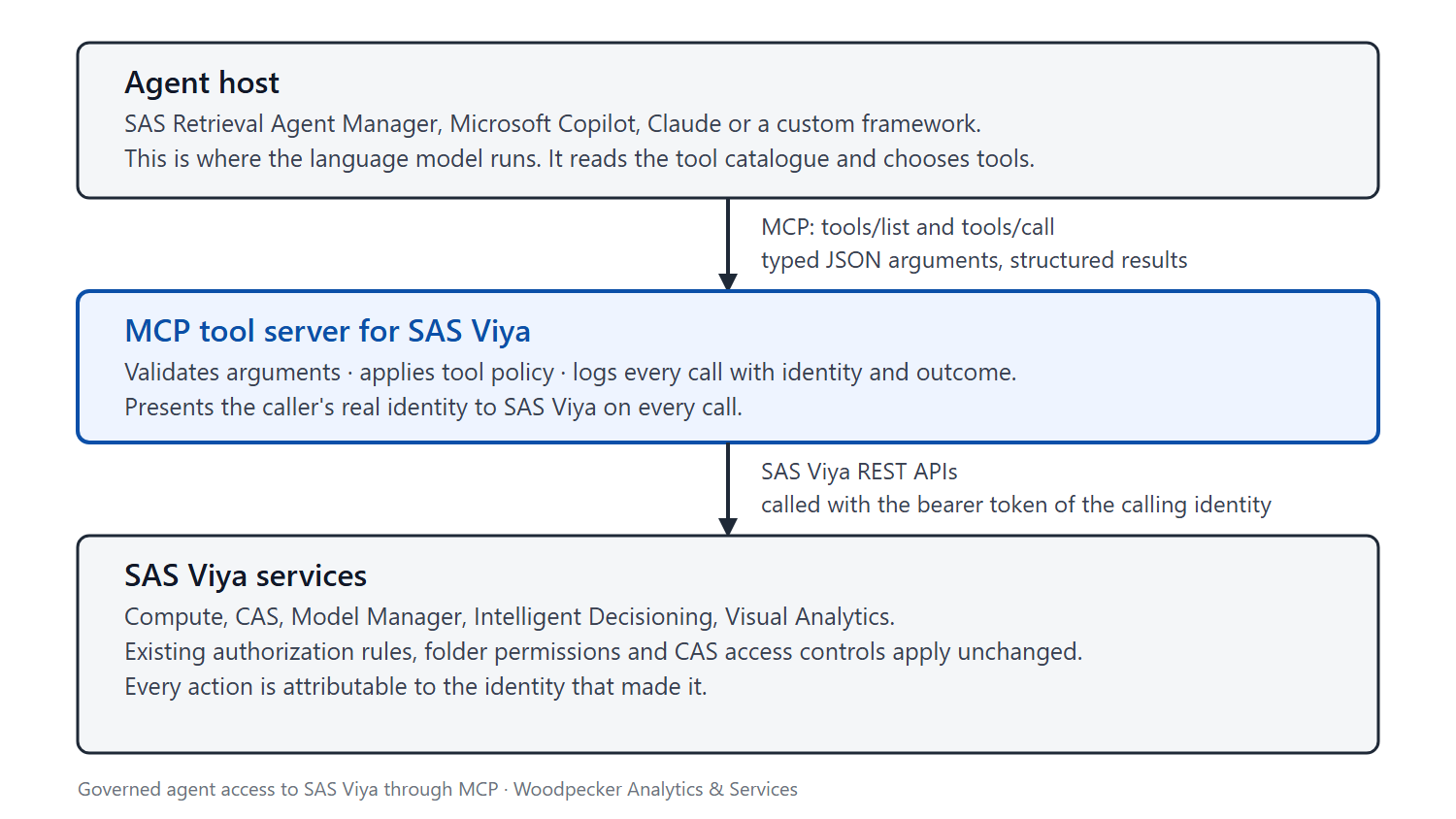
MCP is a client-server protocol. The client is the agent host: SAS Retrieval Agent Manager, an assistant such
as Microsoft Copilot or Claude, or a custom framework. The server is a process that publishes a catalogue
of tools. Each tool has a name, a description and a typed JSON schema for its inputs. The host uses two
operations that matter here: list the tools, and call a tool with arguments.
The language model never touches SAS Viya. It reads the catalogue, chooses a tool and produces
arguments. The server validates the arguments, calls the relevant SAS Viya REST API with the caller's
credentials, and returns a structured result. The model then decides what to do next.
If you already automate SAS Viya through its REST APIs, this will look familiar, because it is the same
surface with a different consumer. SAS's own enablement team put it plainly in August 2026: "The SAS Viya
MCP Server is not a replacement for SAS REST APIs." It is a curated layer on top of them, shaped for a
consumer that reasons in language rather than in HTTP.
Three distinctions save confusion later
- MCP is not SAS Viya Copilot. Copilot is SAS's assistant inside SAS applications. The MCP server faces outward and lets agents that live outside SAS Viya use the platform's capabilities.
- MCP is not retrieval. Retrieval-augmented generation answers questions from documents. A tool call runs something: a compute job, a scoring request, a report export. SAS Retrieval Agent Manager supports both and keeps them distinct.
- MCP is not an authorization system. The protocol carries arguments and results. It does not decide who may do what. That decision stays where it is today, in SAS Viya's authorization rules, folder permissions and CAS access controls. The server's job is to present a real identity to them, every time.
Why this matters for a SAS Viya estate specifically
Two properties of SAS Viya make it unusually well placed for this.
First, the platform is already API-first. Every service you would want an agent to use, from Compute and
CAS to Model Manager, Intelligent Decisioning and Visual Analytics, is reachable over authenticated REST,
and all of it sits behind one identity service, SAS Logon, and one authorization model. An MCP server does
not have to invent controls. It inherits them.
Second, SAS has made the entry point official. The SAS Viya MCP Server is published as an Apache-2.0
project on GitHub, is "included with a SAS Viya subscription at no additional cost" according to SAS, and as
of version 1.12.0 on 2 September 2026 exposes 75 tools across nine selectable tiers. SAS's product page
states that "all agent actions are authenticated, authorized and logged." SAS Retrieval Agent Manager,
SAS's product for building retrieval and agent applications, registers MCP tool servers centrally, and SAS
publishes a template for running its own server there.
SAS also says the uncomfortable part out loud. The Retrieval Agent Manager guide cautions: "Connect only
to tool servers from secure, trusted sources", and continues that customers "are responsible for ensuring
that all tool server connections are secure, tested, vetted under applicable internal security policies, and
compliant with applicable law." That sentence applies to every tool server, including SAS's, including ours.
Put those together and the decision in front of you is no longer whether to allow agents near SAS Viya.
SAS has shipped both the server and a runtime for it. The decision is how to govern what runs through
them.
What governed agentic access looks like in practice
We run five controls. Each maps to something you can inspect.
1. Identity, not a shared robot account. Every tool call should execute under a real identity: an interactive
user's token obtained through the OAuth 2.0 authorization code flow with PKCE, or a registered client
using client credentials for unattended agents. SAS Viya then applies its existing rules. An analyst's agent
sees the caslibs, folders and models that analyst can see, and nothing else. The failure mode to avoid is a
single service account with broad rights behind every agent. It makes audit trails meaningless and turns
one prompt injection into a platform-wide incident.
2. The tool surface is policy. A tool the model cannot see is a tool it cannot call. SAS's server demonstrates
the pattern well: tiers select which tool groups a deployment exposes, and a read-only mode withholds
anything that changes state or causes server-side work, under a fail-closed rule that "a tool that is not
explicitly classified as read-only is withheld." The same classification is advertised to clients as MCP tool
annotations, so an approval interface can pass reads through and pause before writes. Apply the principle
per agent. A model-inventory assistant never needs publish or delete tools.
3. Every call is an attributable event. Log the identity, the tool, the arguments, the outcome and the
latency for every call, and correlate it with SAS Viya's own audit records. We go one step further and
require the agent to state the goal it is serving in each call, so the log reads as intent plus action rather
than a list of API hits. That record is what you hand to an auditor.
4. Agents prepare, humans commit. Some actions carry business consequence: publishing a model,
activating a decision revision, changing how alerts route. Keep those behind a human approval step, either
in the client's approval interface or by withholding the write tools from the agent entirely and leaving the
final step to a person. The agent can draft the rule set, run the test and assemble the evidence. A person
locks the revision.
5. The data boundary is a design decision. Whatever a tool returns is visible to the language model that
called it. Decide where that model runs and under what agreement, prefer tools that return summaries and
identifiers over row-level extracts, and treat every tool result as data leaving the platform's perimeter. For
banks and insurers this is the control your risk function will ask about first.
An illustrative exchange, simplified. Tool names are from SAS's published server. The session is fictional.
What changes operationally
The tool catalogue is a versioned artefact. SAS's server went from 26 tools in May 2026 to 75 in
September 2026, with 20 releases between June and September. Expect the same pace from any provider,
including us. Pin the server version in each environment, promote it through development, test and
production like any other change, and diff the tool list at every upgrade, because a new write tool is a new
capability your agents may pick up silently.
Access reviews include agents. Each agent has an identity, a tool set and an owner. Review them on the
same cycle as privileged human accounts. When a person leaves, the tokens their agents used leave with
them.
Ownership splits cleanly. The platform team owns the tool server, its version and its catalogue. Analytics
teams own prompts, agents and evaluation. A change board approves any new write tool, exactly as it
would approve a new integration. Mixing these roles is how shadow agents appear.
Auditors get better evidence. A complete tool-call log with identity and intent, an approval record for
consequential actions, and a version history of which tools existed when, is more than most REST
integrations produce today. Regulators across India and Southeast Asia already expect model inventories,
change control and audit trails for analytical systems. Agentic access, done this way, extends those
artefacts.
Start read-only. Nothing above requires write access on day one. Read-only tools answer a large share of
real questions: which models exist, which are champions, what a decision's inputs are, which reports
depend on a table. A month of read-only use produces the logs and the confidence you need before
opening write tools behind approvals.
Where Woodpecker fits
Woodpecker is a SAS Silver Partner and SAS's 2025 APJ Solution Provider Partner of the Year, working from
Pune and Singapore on SAS Viya, anti-money laundering, fraud and risk implementations for banks and
insurers. WPIntelliAgent is our MCP tool server for SAS Viya. As of September 2026 it exposes 246 tools
spanning compute and data, Visual Analytics, model management and scoring, Intelligent Decisioning, Visual Investigator scenario administration, scheduling and forecasting. It registers in SAS Retrieval Agent
Manager as a remote tool server, authenticates every call through SAS Logon, supports tier selection, and
keeps an opt-in per-call usage log that records the goal the agent stated for each call. The five controls
above are the ones we run.
Where to start
A practical first month looks like this
1. Stand up an MCP tool server against a non-production SAS Viya environment, SAS's own server or
ours, and register it in SAS Retrieval Agent Manager or in the MCP client your teams already use.
2. Expose read-only tools only, bound to a real user identity rather than a shared account.
3. Pick one question the business keeps asking.Model inventory and champion status is a good first
candidate. Report lineage is another.
4. Review the tool-call log weekly with the platform owner and the model risk function in the room.
5. After a month, open one write tool behind an approval step, and repeat.
If you would like to compare notes on running this against your own estate, talk to us.
Sources
- SAS, SAS Viya MCP Server product page
- SAS, press release, SAS Innovate, 28 April 2026
- SAS, sassoftware/sas-mcp-server on GitHub, README and releases, v1.12.0, 2 September 2026
- SAS, SAS Retrieval Agent Manager product page
- SAS, Retrieval Agent Manager User's Guide, About MCP Tools, June 2026
- SAS, Retrieval Agent Manager examples, container MCP servers
- SAS Communities Library, From REST APIs to AI Agents: Why the SAS Viya MCP Server Matters, August 2026
- SAS Communities Library, Connecting GitHub Copilot to SAS Viya with the SAS Viya MCP Server, May 2026 (source of the 26-tool figure)
- SAS blog, Building a governed banking workflow with SAS Viya MCP Server and Claude Cowork, August 2026
- Model Context Protocol, tool annotations, specification revision 2025-03-26
SAS and all other SAS Institute Inc. product or service names are registered trademarks or trademarks of SAS
Institute Inc. in the USA and other countries. ® indicates USA registration. Other brand and product names
are trademarks of their respective companies
About Woodpecker Analytics & Services. Woodpecker is a SAS Silver Partner headquartered in Pune,
India, with an office in Singapore, and was named SAS 2025 Partner of the Year in the APJ Solution Provider
category. The team implements, migrates and administers SAS Viya for organisations in banking, insurance,
retail, telecom and government.